1<!-- #region commentray:readme-lede -->
| |
3# Commentray — a side-by-side documentation ecosystem
5[](https://www.npmjs.com/package/commentray)
6[](https://www.npmjs.com/package/@commentray/core)
7[](https://www.npmjs.com/package/@commentray/render)
8[](https://www.npmjs.com/package/@commentray/mcp-server)
9[](https://marketplace.visualstudio.com/items?itemName=d-led.commentray-vscode)
11Have you ever wished a “commentary track” for code the way DVD extras let filmmakers talk over a film without changing the picture? When looking at code, that might answer the whys, reveal the intent besides the code itself.
13The ecosystem is a handful of published npm libraries, the commentray CLI, and a VS Code or Cursor extension. They share one configuration file and one companion tree next to your sources. Tooling ties commentary to the code: optional Git hooks, validation and doctor flows, migrations, rendering, static site output, a **local** `commentray serve` helper for preview (not the production host—you deploy `_site/` elsewhere), and standalone executables when you do not want a Node install. For how checks split across hook, CLI, editor, and what this repository’s own CI runs versus validate, see [What Commentray detects](docs/user/detection.md).





Have you ever wished a “commentary track” for code the way DVD extras let filmmakers talk over a film without changing the picture? When looking at code, that might answer the whys, reveal the intent besides the code itself.
The ecosystem is a handful of published npm libraries, the commentray CLI, and a VS Code or Cursor extension. They share one configuration file and one companion tree next to your sources. Tooling ties commentary to the code: optional Git hooks, validation and doctor flows, migrations, rendering, static site output, a local commentray serve helper for preview (not the production host—you deploy _site/ elsewhere), and standalone executables when you do not want a Node install. For how checks split across hook, CLI, editor, and what this repository’s own CI runs versus validate, see What Commentray detects. | You have the main README.md in the left column: packages, scripts, release flow. This file is commentray for that README—the voice-over beside the facts, not a second brochure.
If this is your first pass, try a quick interaction: scroll either pane and watch the other follow, then tap the Help button in the top bar if you want the guided tour again.
|
15<!-- #endregion commentray:readme-lede -->
| |
16<!-- #region commentray:readme-why -->
| |
20Inline comments are not always possible (generated files, tight formats, policy). Commentray keeps the primary artifact clean while storing rationale, warnings, and diagrams in companion Markdown under a commentray folder beside the code it explains. In a meeting you might hear someone say they need to document architecture in commentray so newcomers can onboard from the source—same word names the tool and the habit; context disambiguates.
22The same split helps when you want rich context for a person or a chatbot—runbooks, product rationale, incident notes, onboarding prose—that does not belong in the source file itself, yet stays tied to specific lines or regions through the metadata index and block anchors, so “this commentary goes with that code” stays obvious without pasting a wall of inline comments into the repo.
24That is useful for developers and architects, for LLM-assisted workflows that need context beside the primary file, for onboarding next to the code, for optional pre-commit checks on companion metadata, and for publishing a code-plus-commentary static site (for example GitHub Pages) with scroll-linked panes.
Why
Inline comments are not always possible (generated files, tight formats, policy). Commentray keeps the primary artifact clean while storing rationale, warnings, and diagrams in companion Markdown under a commentray folder beside the code it explains. In a meeting you might hear someone say they need to document architecture in commentray so newcomers can onboard from the source—same word names the tool and the habit; context disambiguates.
The same split helps when you want rich context for a person or a chatbot—runbooks, product rationale, incident notes, onboarding prose—that does not belong in the source file itself, yet stays tied to specific lines or regions through the metadata index and block anchors, so “this commentary goes with that code” stays obvious without pasting a wall of inline comments into the repo.
That is useful for developers and architects, for LLM-assisted workflows that need context beside the primary file, for onboarding next to the code, for optional pre-commit checks on companion metadata, and for publishing a code-plus-commentary static site (for example GitHub Pages) with scroll-linked panes. | The README’s Why section names the product (Commentray) and the prose you write (commentray). Same checkout, two panes: the left states what exists; this column states why it is shaped that way and where the edges are.
|
26<!-- #endregion commentray:readme-why -->
| |
| |
28<!-- #region commentray:readme-user-guides -->
| |
32Short guides live under docs/user—install, first setup, keeping blocks aligned, what each layer catches, CLI reference, configuration, and troubleshooting:
34- [Install](docs/user/install.md)
35- [Quickstart](docs/user/quickstart.md)
36- [Keeping blocks in sync](docs/user/keeping-blocks-in-sync.md)
37- [What Commentray detects](docs/user/detection.md)
38- [CLI reference](docs/user/cli.md)
39- [Configuration](docs/user/config.md)
40- [Troubleshooting](docs/user/troubleshooting.md)
Short guides live under docs/user—install, first setup, keeping blocks aligned, what each layer catches, CLI reference, configuration, and troubleshooting:
| The README’s Using Commentray section links short guides under docs/user/—install, quickstart, keeping blocks in sync, detection, CLI reference, configuration, troubleshooting—without walking the whole monorepo first.
On GitHub Pages the split is live: Code is this repo’s README.md; Commentray is this file, rendered as HTML. Scroll either pane—the other follows in lockstep (block stretch when index.json uses marker: anchors backed by paired <!-- #region commentray:… --> / <!-- #endregion … --> delimiters in README.md, plus matching <!-- commentray:block id=… --> markers here; otherwise proportional sync). That is the DVD-style commentary metaphor without installing anything.
The deploy is a single HTML file, so in-commentray Markdown links rewritten to repo-relative paths can 404 on Pages; use full https://github.com/…/blob/… URLs when the link must work from the static site.
Search: Escape clears the query and hides hit results (same as Clear).
Images next to this file
Keep images in the same directory as this .md (or a normal subfolder like ./assets/) and reference them with ./… paths—the VS Code Markdown preview and path completions use the same CommonMark rules. Static HTML rules: docs/spec/storage.md § Images (local img must resolve under .commentray/; use https://… for diagrams outside storage).
Real screenshots: run bash scripts/refresh-root-readme-screenshots.sh (or npm run extension:commentray-screenshots), capture the UI, save files under ./assets/ here, then  like any other Markdown project. For the VS Code extension README walk-through PNGs, see .commentray/source/packages/vscode/README.md/main.md → Maintainer.
The VS Code / Cursor extension is for authoring: Commentray: Open commentray beside source, both editors visible, scroll source and let commentray track. After Commentray: Add block from selection, sync can snap to the block that owns the visible source lines when index.json and <!-- commentray:block id=… --> markers agree; otherwise you stay on proportional sync. Same storage model as the site; the extension is where editing stays pleasant.
Why this file exists
The README stays scannable. Here we keep motive, trade-offs, and sharp edges—without duplicating another full quickstart.
If you only do one thing
Clone and npm run setup (see README). Then pick editor install script or cli:install; both land on the same .commentray/ layout and validators. Same model, different entrypoints.
About this HTML
You may be reading a generated page: @commentray/code-commentray-static, build-static-pages.mjs, and pages.yml. Point [static_site] at another source file and you get the same layout—configuration is reuse, not a fork.
Cookbook (tone, not a second README)
- Greenfield adopt —
commentray init is idempotent; nothing in the primary tree has to move first.
- One-off CLI —
npx commentray … needs no global install; npx commentray --help prints Usage: commentray [options] [command] (same as Install describes for npm).
- Hook paranoia —
init scm runs validate before merge; opt-in because hooks are a team contract.
- “Why is my tree red?” —
doctor stacks environment checks on validate.
- Binaries — standalone CLI assets ship on GitHub Releases with each
v* tag; CI artifacts from .github/workflows/binaries.yml expire after 14 days by design.
- Your own Pages — Copy
.commentray.toml, adjust [static_site], run npm run pages:build.
Architecture (who talks to whom)
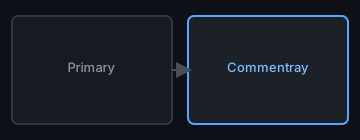
Do not duplicate the README’s package list here—that list is canonical. The diagram below is roles, not package names—see the Architecture angle for the exact @commentray/* dependency graph.
In one line: core holds paths and index truth; render holds safe HTML; cli and the extension are surfaces; the static-site package is the thinnest consumer of render for publishing. Change the HTML contract, then walk that chain backward before you tag.
Reference (jump off points)
Not a substitute for inline comments where the medium allows. Not a hosted blog—commentray lives in git with the code it explains. Not editor-exclusive—the CLI is the same story without a GUI.
|
42<!-- #endregion commentray:readme-user-guides -->
| |
| |
| |
| |
46The [install guide](docs/user/install.md) walks through npm global, **`npx commentray`** (one-off; **`npx commentray --help`** → `Usage: commentray [options] [command]`), release binaries, and the Marketplace extension. Clone workflows, local binary builds, and macOS quarantine sit in [Development → CLI, binaries, and Pages](docs/development.md#cli-binaries-and-pages). If you want Node-free installs, use [GitHub Releases](https://github.com/d-led/commentray/releases); [Development](docs/development.md#cli-binaries-and-pages) explains which artifacts are meant to last.
The install guide walks through npm global, npx commentray (one-off; npx commentray --help → Usage: commentray [options] [command]), release binaries, and the Marketplace extension. Clone workflows, local binary builds, and macOS quarantine sit in Development → CLI, binaries, and Pages. If you want Node-free installs, use GitHub Releases; Development explains which artifacts are meant to last. | |
| |
48## AI Coding Assistants (MCP)
AI Coding Assistants (MCP) | |
| |
50Commentray ships an [MCP server](docs/user/mcp-server.md) so AI assistants can validate, discover, read, and write commentary. Start with:
Commentray ships an MCP server so AI assistants can validate, discover, read, and write commentary. Start with: | |
| |
| |
53commentray mcp install # writes .vscode/mcp.json, .claude/mcp.json, etc.
commentray mcp install # writes .vscode/mcp.json, .claude/mcp.json, etc. | |
| |
| |
56This gives your AI coding assistant 16 tools — from `commentray_list_pairs` and `commentray_find_uncommented` to `commentray_read_commentray` and `commentray_validate`. See the [MCP guide](docs/user/mcp-server.md) for setup and tool reference.
This gives your AI coding assistant 16 tools — from commentray_list_pairs and commentray_find_uncommented to commentray_read_commentray and commentray_validate. See the MCP guide for setup and tool reference. | |
| |
58## Ecosystem & this repo
Ecosystem & this repo | |
| |
60Layout, day-to-day commands, quality gate, Cypress, Pages, and releases for people working on Commentray itself are in [Development](docs/development.md), including [dogfood: README on GitHub Pages](docs/development.md#dogfood-readme-on-github-pages). The contributor contract is in [CONTRIBUTING.md](CONTRIBUTING.md).
Layout, day-to-day commands, quality gate, Cypress, Pages, and releases for people working on Commentray itself are in Development, including dogfood: README on GitHub Pages. The contributor contract is in CONTRIBUTING.md. | |
| |
| |
| |
64Packages in this monorepo are licensed under MPL-2.0 (see LICENSE and per-package copies).
Packages in this monorepo are licensed under MPL-2.0 (see LICENSE and per-package copies). | |
| |
| |
| |
68Repository: [github.com/d-led/commentray](https://github.com/d-led/commentray). The name Commentray sidesteps an existing “commentary” extension identity on the [Visual Studio Marketplace](https://marketplace.visualstudio.com/items?itemName=jaredhughes.commentary); the project nearly used “commentary” instead.
Repository: github.com/d-led/commentray. The name Commentray sidesteps an existing “commentary” extension identity on the Visual Studio Marketplace; the project nearly used “commentary” instead. | |
| |
| |
| |
72<!-- #region commentray:readme-mobile-flip-check -->
| |
74See [CONTRIBUTING.md](CONTRIBUTING.md) and [Development](docs/development.md).
| Narrow viewport check (README ↔ this angle)
On GitHub Pages, use a narrow viewport (or a phone), scroll this README to the bottom, then use flip source / commentary. Scroll should stay block-linked with this companion file, and a second flip control appears when the toolbar flip scrolls off-screen.
The readme-mobile-flip-check region pairs README.md delimiters with this <!-- commentray:block id=readme-mobile-flip-check --> section: scroll the Code column to the tail, flip to Commentray and back—the panes should stay aligned with that block, and the duplicate flip should appear once the toolbar control is off-screen. |
76<!-- #endregion commentray:readme-mobile-flip-check -->
| |
| |